
Fishbrain - Fishing App
FishbrainSports
4.515.94K Reviews
- Version
- 11.70.1
- Installs
- 10.00M
- Age Rating
- Teen
Screenshots
Our Review of Fishbrain - Fishing App
 Analysis by Appyee
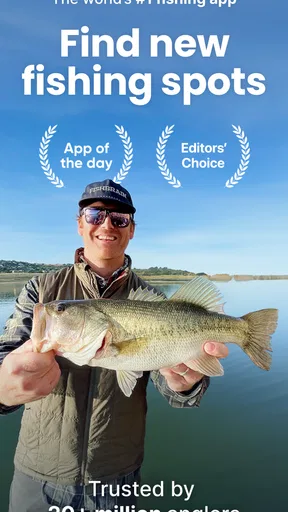
Have you ever felt that itch to go fishing but weren't quite sure where the best spot might be? I’ve been there, staring at a map, wondering if today is the day I finally catch that elusive big one. That's when I stumbled upon Fishbrain, and it was like finding a secret map to hidden treasures.
That promise needs a little perspective: no map can guarantee a bite, and reports from other anglers are clues rather than instructions. I find the app most useful when I treat it as a way to narrow down possibilities, then make my own decisions on the bank. It works best as a companion to local knowledge and a bit of patience, not as a substitute for either.
The Ultimate Fishing Companion
So, what's the deal with Fishbrain? Imagine having a buddy who's a fishing guru, always ready to share tips about where the fish are biting. This app is like that buddy, available 24/7. It’s tailored for both seasoned anglers and beginners, making it a versatile tool in your fishing arsenal.
Fishbrain is a free sports app from Fishbrain, and its long-running angler community is part of the appeal: it has been around since February 25, 2013, and has more than five million installs. The average rating is 4.5 from around 64,000 ratings, with about 16,000 written reviews. I wouldn’t use those numbers as proof that every local map is equally informative, though. Community activity naturally varies from one waterway to another, so a busy fishing region may offer more useful context than a quiet one.
Features That Hook You
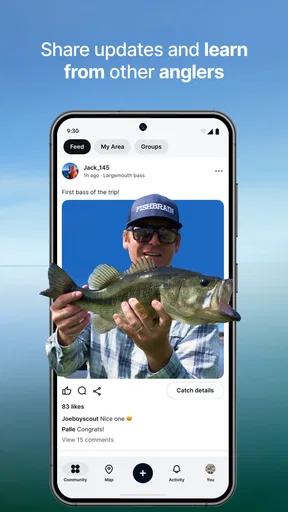
First off, let’s talk about the community aspect. Fishbrain is not just an app; it's a social network for fishing enthusiasts. You can connect with fellow anglers, share your catches, and even brag a little about that monster bass you reeled in last weekend. It's like Instagram, but for fishing, and I have to admit, it’s pretty addictive.
The social side is most valuable when it helps answer practical questions, not when it turns a quiet hobby into a contest. I’d look at posts for patterns—what people are catching, which species appear in an area, and whether reports are recent—rather than assume another angler’s success will repeat on my visit. If you prefer to keep your fishing private or don’t enjoy sharing photos and interacting with a community, this part may feel unnecessary. A standalone map or a personal log could suit you better.
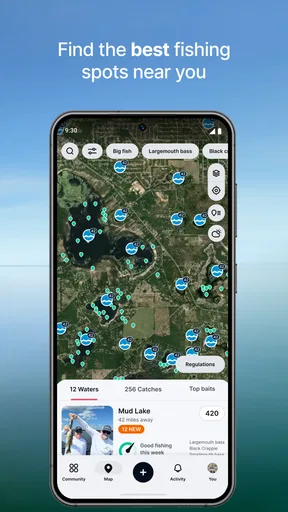
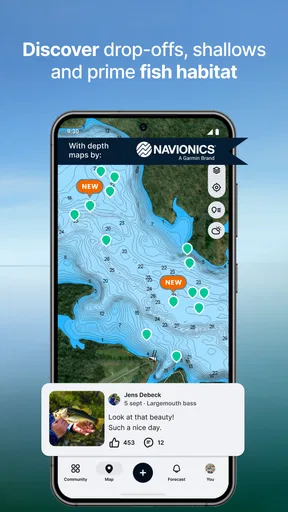
The app's map feature is a game-changer. You get real-time data on fishing spots, complete with user-generated reports about what fish are biting where. This is gold for someone like me who loves to explore new places but doesn’t want to waste time casting in the wrong spot. Plus, you can log your own fishing trips, which becomes a handy diary of your fishing adventures.
One useful habit is to check the map before leaving home, then use reports as a shortlist rather than a route plan. A pin or catch report may help you decide which stretch to investigate, but access, water conditions, and local restrictions still need your own attention. I’d also make a brief trip log after fishing, even when the day is uneventful. Recording where and when you tried, along with what you used, gives future visits a more dependable point of comparison than memory alone.
For a realistic weekend example, imagine I have a free morning and want to try a waterway I haven’t fished before. I can scan nearby reports, note a couple of candidate areas, and choose one that makes sense for the time I have. Once there, I still check that I can legally and safely reach the water and adapt if the conditions differ from what a post suggests. Afterward, my own log can help me remember what I learned, whether or not I caught anything. That is a more reliable workflow than driving to a single “hot spot” expecting a guaranteed result.
Advanced Tools for the Avid Angler
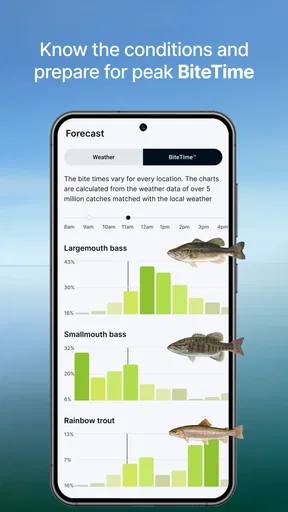
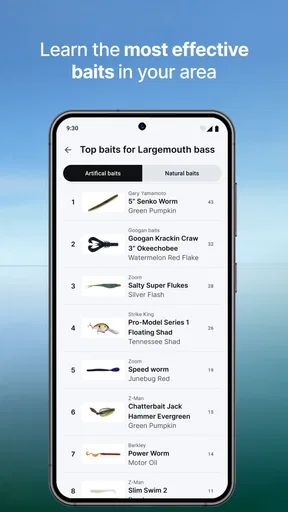
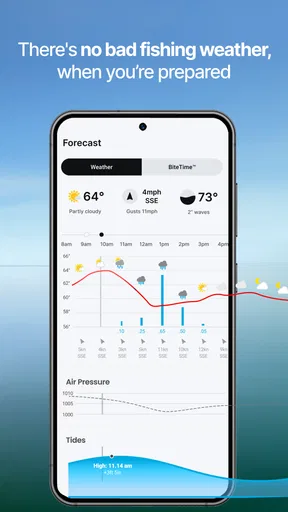
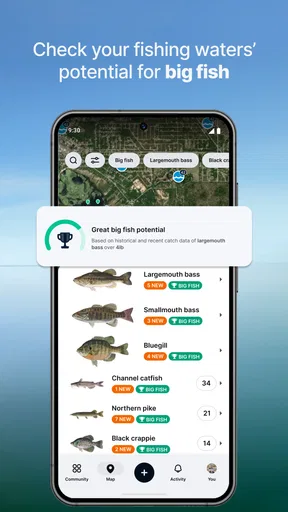
Fishbrain offers a premium version that unlocks even more features. With the premium upgrade, you get access to advanced weather forecasts, including wind speed and direction, which can be crucial for planning your day on the water. The app also provides detailed information on fish species, including feeding patterns and preferred baits, helping you tailor your strategy.
There is a practical trade-off here: the app is free to start, while some tools sit behind in-app purchases. Those purchases range from $1.99 to $199.99 per item, so I’d first decide what I actually need rather than assume a paid tier is essential. If I already use a trusted weather service or have a reliable local guide to species and bait, I may not need to pay for overlapping information. If planning conditions and species details are central to how I fish, the extra tools may be more useful.
One of the coolest features is the “Catch Statistics” tool, which analyzes your catches and provides insights to improve your techniques. It’s like having a personal fishing coach right in your pocket. I found this particularly useful when trying to up my game.
To get more from any catch analysis, I’d be consistent about recording trips and catches instead of logging only the memorable successes. A collection of notes can help reveal what tends to work for me across different outings; a handful of exceptional catches is much less useful for spotting a pattern. I’d still treat any suggested insight as a prompt to test, not a rule. Fishing depends on changing conditions, and an apparent trend in my own records doesn’t mean the same approach will work every time.
This distinction also helps when comparing Fishbrain with the usual alternatives. A general map app is often enough for navigation, while a notebook is simpler for private trip records. Fishbrain brings those fishing-oriented community reports and logging into one place, which is convenient if I want both. But if I only need directions, or don’t want a social layer, a simpler map or notebook may be faster and less distracting.
User-Friendly Interface
Now, let's chat about the user experience. Fishbrain’s interface is intuitive and easy to navigate. Even if you’re not tech-savvy, you’ll find it simple to use. The app has a clean design, with all the essential features easily accessible. I appreciated the fact that I didn’t have to dig through menus to find what I needed.
My expectations for speed are modest in a sensible way: looking through a map and community posts is a different task from using a paper notebook, and the amount of information on screen can affect how quickly I find what matters. I’d keep the outing workflow simple by checking likely locations and recent reports beforehand, then avoiding unnecessary browsing once I’m fishing. That saves attention for the water, which is more important than having every post open at the bank.
Notifications are another feature that keeps you in the loop. You can set alerts for updates about specific fishing spots or whenever someone comments on your posts. It’s a neat way to stay connected without being glued to your phone.
There is a balance to strike with alerts. Updates can be handy when I’m following a particular location or conversation, but frequent social activity can also pull attention away from a trip. I’d enable only the notifications that have a clear purpose and review them when I’m planning, rather than letting every interaction interrupt time outdoors. If I want fishing to be a quiet break from my phone, I can simply use the app as a planning tool and leave the social side for later.
As with any feature-rich app, the experience depends partly on the device and connection available. Fishbrain’s current version is 11.51.0.(23360), and it requires Android 10 or later. I’d check that requirement before installing on an older Android phone. On a device that meets it, I’d still be mindful of battery and mobile data during a long outing: map browsing, photos, and repeated updates can mean more screen time than a paper chart. I would plan the route and review useful information before heading out, especially if I expect limited connectivity at the water.
Reliability also means knowing how to recover when a plan changes. If a spot proves inaccessible or reports don’t match what I see, I’d move to another candidate and use the app as a reference rather than wait for it to settle the question. Keeping my own notes after the trip means I’m not relying entirely on community posts the next time I return. The strongest setup is a mix of Fishbrain’s shared information, personal observations, and ordinary preparation.
The age rating is Teen, so it’s aimed at a broad audience rather than being a children’s fishing game. Beginners can use it to explore fishing reports and build a record of outings, while experienced anglers may appreciate the combination of maps, community activity, and optional tools. I’d recommend it most to people who fish often enough to benefit from comparing trips or who enjoy learning from other anglers. Someone who fishes only occasionally, dislikes social apps, or wants guaranteed instructions for a catch may find a basic map and their own notes more comfortable.
Wrapping It Up
In a nutshell, Fishbrain is more than just an app; it’s a community and a tool that enhances your fishing experience. Whether you’re out to catch dinner or just enjoy a peaceful day by the water, Fishbrain has your back. It’s like having the world’s best fishing guide right in your pocket.
I’d soften that last comparison: no app can replace a guide’s personal knowledge or make a difficult day predictable. What it can do is help me prepare, discover reports I might otherwise miss, and keep a record that improves my own understanding over time. Its best contribution is bringing those tasks together, not promising a shortcut to fish.
If you’re serious about fishing, or even if you just enjoy a casual cast now and then, give Fishbrain a try. It might just become your new favorite fishing buddy.
For me, the performance verdict is that Fishbrain makes most sense when I use it deliberately: check a few locations before setting out, take useful details from the community, and record what I learn afterward. The free starting point makes it easy to see whether that routine fits, while purchases are there for people who want more of the advanced toolkit. If that blend of fishing maps and social reports sounds useful, it’s worth trying; if you want an entirely offline, private, no-frills log, I’d choose a simpler alternative.
Privacy and Permissions
See what permissions an app requests and how it handles your data.
- Contacts
- read your contacts
- Location
- approximate location (network-based), precise location (GPS and network-based)
- Photos/Media/Files
- read the contents of your USB storage, modify or delete the contents of your USB storage
- Storage
- read the contents of your USB storage, modify or delete the contents of your USB storage
- Camera
- take pictures and videos
- Wi-Fi connection information
- view Wi-Fi connections
- Other
- view network connections, full network access, control vibration, prevent device from sleeping, read Google service configuration
Verdict
Strengths of Fishbrain - Fishing App
- Detailed fishing maps available.
- Real-time weather updates.
- Community of fishing enthusiasts.
- Catch log with GPS tagging.
- Fishing gear recommendations.
Limitations of Fishbrain - Fishing App
- Some features require premium.
- Occasional app crashes reported.
- GPS can drain battery quickly.
- Limited offline functionality.
- Ads in the free version.
Similar Picks in This Category
View All
BeSoccer: Soccer Live Score
BeSoccer apps4.3

Cricbuzz - Live Cricket Scores
Cricbuzz.com3.7

NFL
NFL Enterprises LLC2.4

Da Fit
MO YOUNG LIMITED3.6

ESPN
Disney4.5

LiveScore: Live Sports Scores
LiveScore Limited4.5
Frequently Asked Questions
What features does Fishbrain offer for fishing enthusiasts?
Fishbrain is packed with features tailored for fishing enthusiasts. It provides detailed maps, weather updates, and fishing forecasts to enhance your trips. Additionally, it offers a social platform to connect with other anglers, share catches, and gain insights from community-shared fishing spots. The app also includes a species recognition feature for identifying your catches.
Is Fishbrain available for both Android and iOS devices?
Yes, Fishbrain is available for download on both Android and iOS platforms. Users can easily find it on the Google Play Store for Android devices and the Apple App Store for iOS devices. This ensures a wide range of compatibility and accessibility for fishing enthusiasts using different smartphones.
Does Fishbrain require a subscription for full access?
Fishbrain offers a free version with basic features, but to unlock its full potential, a premium subscription is recommended. The premium version provides advanced features like detailed catch statistics, access to exclusive fishing forecasts, and additional insights into fishing spots, helping you elevate your fishing experience.
How can Fishbrain enhance my fishing experience?
Fishbrain enhances your fishing experience by providing real-time data and insights. It offers weather forecasts, tidal patterns, and optimal fishing times based on community data. The app also allows you to log your catches and interact with a global community of anglers, sharing tips and experiences to improve your skills.
Is Fishbrain suitable for beginners in fishing?
Absolutely, Fishbrain is designed to cater to both beginners and seasoned anglers. For beginners, the app offers educational content, tutorials, and community support to help them learn the basics. The interactive maps and species recognition feature also aid newcomers in understanding where and what to fish.
